How to create and approve a lease through e-Devlet in Türkiye
The Ministry of Treasury and Finance’s Lease Agreement Transactions service lets eligible owners or authorised representatives prepare a lease online. The tenant and any guarantor included in the process can review it through their own accounts. The completed record can be downloaded as a time-stamped document with a verification barcode.
The Ministry of Treasury and Finance’s Lease Agreement Transactions service lets eligible owners or authorised representatives prepare a lease online.
The completed record can be downloaded as a time-stamped document with a verification barcode.
About the online lease service
The tenant and any guarantor included in the process can review it through their own accounts.
How the landlord prepares a lease
Sign in to Lease Agreement Transactions, select the relevant property and follow the form prompts.
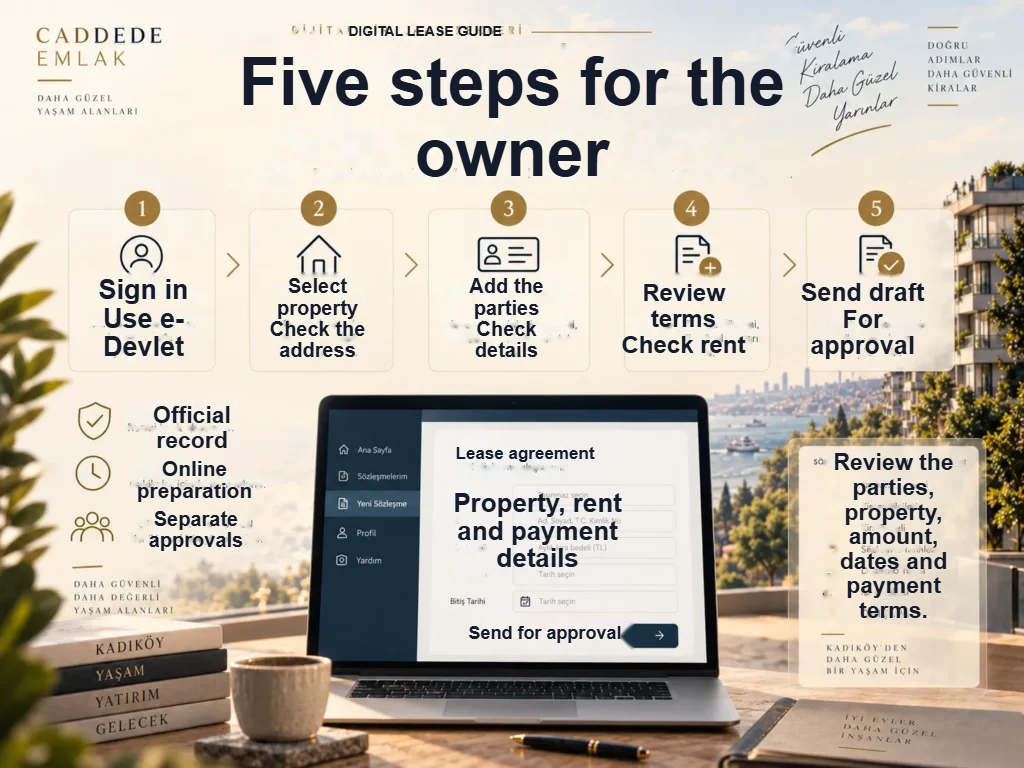
Review the parties’ details, property address, term, rent, payment date, payment details and additional terms before sending the draft. Include an inventory or allocation of building dues where relevant.
How the tenant and guarantor approve it
Open the pending agreement from your own account.
| Criterion | Paper lease | e-Devlet lease |
|---|---|---|
| Signature and date | Signed document | Time-stamped record |
| Utility applications | Supplier requirements apply | Check online acceptance |
| Party approvals | Signatures as required | Separate accounts |
| Rent increases | Applicable legal limits | Same legal limits |
| Document storage | Keep copies | Download and keep the record |
Check the address, amount, term, increase clause, deposit and payee. If a guarantor is involved, check the approval status and whether the undertaking satisfies the applicable legal formalities. Once all required approvals are in place, download the completed document and retain a copy.
Authorised estate agents and representatives
The service also covers properties for which an estate adviser or another person has been authorised.
Confirm the authority for the specific property.
Check the payment details and payee before approving.
Barcoded records and utility applications
Confirm the authority for the specific property. For electricity, water and gas, check whether the supplier accepts the document online and what additional information it needs. A time stamp and barcode help establish the record; the legal effect in a dispute depends on the case.

The barcode can be used to verify the record.
How to correct an error
Before approval, ask the preparer to correct any incorrect details and check the revised draft.
After approval, consult the current service options and obtain the other party’s agreement where needed. The public sources reviewed did not confirm a universal 15-day correction period.
Frequently asked questions
Is the online service mandatory?
Check whether the portal is available for your situation. Existing written leases should be retained.
Does the service charge a fee?
Check the official service screen for any fees that apply to your transaction.
Is the barcode enough for a utility application?
Ask the supplier about accepted documents and any additional requirements.
What if the tenant does not approve?
A pending draft has not completed the approval process. Check the status and any deadline shown in the portal.
Must paper leases be uploaded?
Keep valid paper agreements and supporting documents. The official service instructions set out the available options.
In the heart of Bağdat Avenue, Join us for a coffee
We would be pleased to welcome you to our Suadiye office to discuss your property sale, purchase or valuation goals in person.